ATOM CUBE FabLab Bergamo

A learning portal from FabLab Bergamo

Look inside the atom.

Build its electron configuration. Rotate its orbitals. Explore how probability clouds turn into the structure of an element.

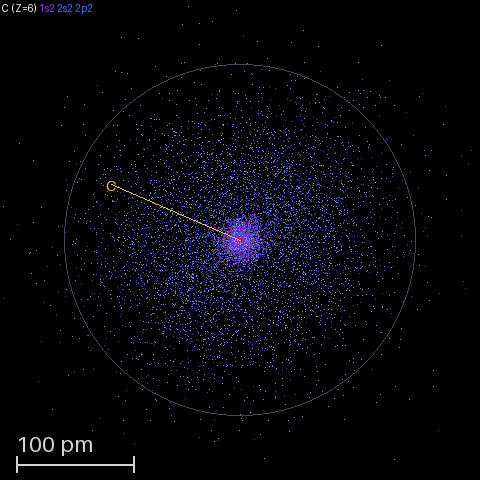
Carbon: a sampled electron probability cloud from the project’s atom viewer.

OBSERVE · COMPARE · UNDERSTAND

Three ways to explore atomic structure

1. Build an electron configuration

Place electrons one at a time. Read orbital boxes, compare shell totals, and see Aufbau, Hund’s rule and Pauli pairing in action. The filling lesson covers all 118 elements, including d and f subshells.

Open the filling animation →

2. See the shape of an orbital

Open the viewer and choose hydrogen orbitals. Rotate the probability cloud to see lobes and nodes from different angles. Quantum numbers describe the state; the point cloud shows its spatial distribution.

Open the 3D viewer →

3. Explore a complete atom

In the viewer, choose Element Explorer. Compare elements and use shell dissection to inspect the occupied subshells. This wider atom model complements the introductory filling lesson.

Explore elements →
Shell, subshell or orbital?

TermMeaningElectron capacity
ShellA principal level identified by n, such as n = 2.At most 2n²
SubshellA family within a shell: s, p, d or f.2, 6, 10 or 14
OrbitalOne spatial state within a subshell; shown as one box.At most 2, with opposite spins

Shells do not simply fill one after another. For example, 4s begins before 3d. Use calcium to see the difference between a shell’s capacity and its actual occupancy.

Try a question, then watch the answer

Follow the physics into the implementation

For a deeper dive, follow the path from a wavefunction to a rotating probability cloud. These technical guides are in English.

  1. Quantum numbers → sampling tables →

    How angular and radial functions become sampling distributions.

  2. Tables → device data →

    How orbital and atomic radial tables are prepared for the device.

  3. Samples → a 3D cloud →

    How sampled coordinates become the points drawn on screen.

  4. Multi-electron atoms →

    Explore screening, radial models and the structure of a complete atom.

Questions about atoms and electrons

Are the dots individual electrons?

No. Each dot is a sampled possible position. Together they show the spatial probability distribution, rather than a path around the nucleus.

What do the arrows in an orbital diagram mean?

They label electron spin states. Two arrows in the same box must have opposite directions; equal-energy orbitals fill singly before electrons pair.

How accurate are the filling clouds?

Hydrogen uses the exact nonrelativistic solution. Helium through uranium use calculated LDA radial orbitals; heavier elements use a screened hydrogen-like approximation. Orbital sizes and nodes come from these models. Filling adds contributions from the final neutral atom, rather than recalculating an ion at every step.